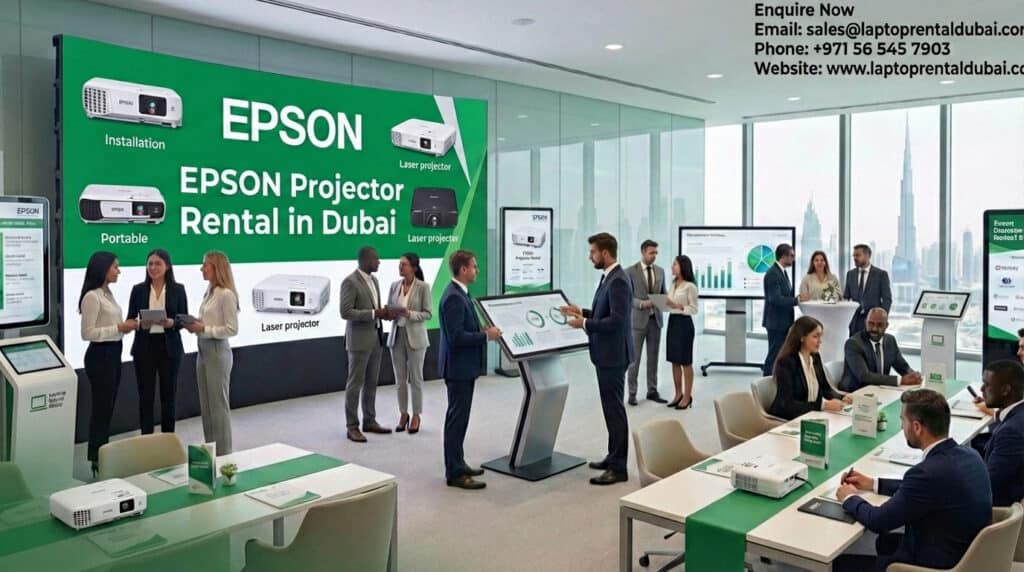
EPSON Projector Rental in Dubai for Meetings, Events & Training

epson projector rental dubai

In today’s business and event-driven world, clear visual presentation is very important. Having the right projector makes a big difference, whether you’re in a boardroom, at a big business event, or at a professional training session. This is why businesses in Dubai rent EPSON projectors from Laptop Rental Dubai: they know they will work well and look professional.

We offer high-quality EPSON projector rentals for meetings, events, and training programs all over Dubai and the UAE at Laptop Rental Dubai.

Website: https://laptoprentaldubai.com/

Why Choose EPSON Projector Rental from Laptop Rental Dubai?

People all over the world trust Epson projectors because they are clear, bright, and long-lasting. You get EPSON projectors when you rent from Laptop Rental Dubai that are:

  • Very bright for rooms with a lot of light
  • A picture that is sharp and clear
  • Reliable for use over a long period of time
  • Works with laptops and media players

Laptop Rental Dubai’s EPSON projector rental in Dubai makes sure that your presentation always looks professional.

EPSON Projector Rental for Corporate Meetings in Dubai

Corporate meetings require smooth visuals and zero technical interruptions. Laptop Rental Dubai provides EPSON projector rental in Dubai for:

  • Boardroom meetings

  • Client presentations

  • Business reviews and planning sessions

By choosing Laptop Rental Dubai, businesses avoid buying expensive projectors while still delivering impactful presentations.

EPSON Projector Rental for Events & Conferences

Dubai hosts conferences, seminars, and corporate events year-round. Laptop Rental Dubai supports event organizers with EPSON projector rental in Dubai for:

  • Corporate conferences

  • Product launches

  • Seminars and workshops

  • Business summits

Our EPSON projectors ensure clear visuals even in large venues.

EPSON Projector Rental for Training & Workshops

Training programs require projectors that can perform continuously without issues. Laptop Rental Dubai offers EPSON projector rental in Dubai for:

  • Corporate training programs

  • Employee onboarding

  • Educational workshops

  • Certification courses

With Laptop Rental Dubai, training sessions run smoothly without technical distractions.

Benefits of Renting EPSON Projectors from Laptop Rental Dubai

Renting is often smarter than buying—especially for short-term use. Laptop Rental Dubai offers:

  • No high upfront investment

  • Flexible rental options (daily, weekly, monthly)

  • Latest EPSON projector models

  • Professional setup and support

  • No maintenance or storage worries

This makes EPSON projector rental in Dubai from Laptop Rental Dubai a cost-effective solution.

Why Businesses Trust Laptop Rental Dubai

Laptop Rental Dubai is a trusted provider of IT and AV equipment rentals across the UAE. Businesses choose Laptop Rental Dubai because we offer:

  • Reliable EPSON projectors

  • Quick delivery and setup

  • Competitive rental pricing

  • Professional technical support

🌐 Website: https://laptoprentaldubai.com/

Contact Laptop Rental Dubai 


Book EPSON Projector Rental Today


📧 Email: [email protected]
📞 Phone / WhatsApp: +971 56 545 7903
🌐 Website: https://laptoprentaldubai.com/

Whether you need EPSON projector rental in Dubai for meetings, events, or training, Laptop Rental Dubai is ready to support you with reliable equipment and professional service.

EPSON Projector Rental in Dubai for Meetings, Events & Training Read More »

Tablet for Kids: The Complete Parent’s Guide to Buying or Renting (2026)

Tablet For Kids Featured Image

Parents may find it difficult to select the best tablet for their children. It’s easy to feel overloaded with the variety of options available today, including educational tablets, entertainment-focused gadgets, and even tablets made specifically for schoolwork. For learning and creativity, parents frequently enquire as to whether they require a tablet with Windows, a tablet without a camera, or a tablet with a pen.

The most frequently asked questions by parents in 2026 are addressed in this guide. It explains whether it makes more sense to buy or rent a tablet for kids, compares options clearly, and helps you understand what really matters.

What Is a Tablet for Kids?

A Tablet for kids are made to encourage education, creativity, and amusement in a secure and regulated environment. In contrast to ordinary tablets, kid-friendly tablets frequently emphasise:

  • Apps and content for education
  • Parental supervision
  • Sturdiness and usability
  • Restricted access to unsuitable features

Children frequently use tablets for homework, online learning, reading, drawing, and supervised screen time.

Tablet for Kids Image

What Should Parents Look for in a Tablet for Kids?

Consider how your child will use a tablet before selecting one.

Important things to think about:

  • The child’s age
  • Needs for entertainment versus learning
  • Durability and screen size
  • Options for parental control

Not every child requires an expensive gadget. Usage, not cost, determines which tablet for kids is best.

Can Children Use a Tablet with Windows?

For older kids who use educational software or take online classes, a tablet with Windows is appropriate.

Advantages of a Windows tablet:

  • supports productivity and educational applications
  • functions similarly to a tiny laptop.
  • Helpful for typing, presentations, and homework
  • An effective transition tool for pupils


Ideal for:

  • Students in middle and high school
  • Children utilising learning platforms based on Microsoft

A Windows tablet might be too complicated for younger kids.

Should You Pick a Tablet Without a Camera?

For reasons of privacy and security, many parents favour a tablet without a camera.

Why it makes sense to have a tablet without a camera:

  • lessens worries about privacy
  • restricts access to unsupervised video
  • Perfect for use in classrooms and exams
  • Reduced interruptions

Particularly common in training facilities, classrooms, and other learning-focused settings are tablets without cameras.

Can Children Benefit from a Tablet with a Pen?

For learning and creativity, a tablet with a pen can be very helpful.

Advantages of using a tablet and pen:

  • promotes creativity and drawing
  • aids in practicing handwriting
  • Useful for note-taking and problem-solving
  • supports apps for interactive learning

For children who prefer writing, art, or visual learning, a tablet with a pen is perfect.

Tablet for Kids: Buying vs Renting

Purchasing a tablet isn’t always the best choice, particularly for young children.

Purchasing makes sense if:

  • Every day, your child uses the tablet.
  • Long-term ownership is what you desire.
  • The tablet will be utilised for several academic years.

It makes sense to rent if:

  • For the time being, you require a tablet.
  • It’s for short-term education or online courses.
  • Before making a purchase, you should test
  • For a brief period, you require several tablets.

Dubai Tablet Rental: A Wise Choice for Parents

For families, schools, and training centers, tablet rental in Dubai offers flexibility and cost savings.

Laptop Rental Dubai provides tablet rental services across the UAE, making it easy to access the right tablet for kids without a high upfront cost.

Advantages of renting from Laptop Rental Dubai:

  • Tablets appropriate for children of various ages
  • Tablets with Windows, tablets without cameras, and tablets with pens are among the options.
  • Plans for short-term and long-term rentals
  • Rentals in bulk for educational institutions and training initiatives
  • Delivery and technical assistance throughout the UAE

This is ideal for online learning, homeschooling, exams, workshops, and temporary educational needs.

Common Applications for Children's Tablets

A tablet for kids can support many different activities.

Typical use cases consist of:

  • E-learning and online courses
  • Apps and games for education
  • Creativity, colouring, and drawing
  • Perusing electronic books
  • Assignments and homework

With the correct tablet, screen time and effective learning can coexist.

People Ask Questions (FAQs)

What is the best tablet for kids in 2026?

Age and usage determine which tablet is best. While older students might require a tablet with Windows, younger children can benefit from simpler tablets.

Is it safe for children to use a tablet without a camera?

Indeed. A tablet provides more privacy and fewer distractions without a camera.

Do children require a tablet and a pen?

A tablet with a pen is helpful for drawing, handwriting practice, and creative learning.

Is renting a tablet preferable to purchasing one?

Renting is frequently more flexible and less expensive for short-term or large-scale needs.

Concluding Remarks: Is a Tablet for Children Worth Purchasing?

When chosen properly, a tablet for kids can be a useful tool for learning and creativity in 2026. The best option will depend on your child’s age and specific needs. learning requirements, whether you need a tablet with Windows for schoolwork, a tablet without a camera for privacy, or a tablet with a pen for creativity.

If you value flexibility over ownership, Laptop Rental Dubai provides a convenient way to rent tablets throughout the United Arab Emirates, assisting parents, educational institutions, and other organisations in providing the appropriate technology without requiring a long-term commitment.

Why Choose Laptop Rental Dubai for Tablet for Kids?

Laptop Rental Dubai is a trusted provider of tablet rental services across the UAE, offering safe and reliable tablet solutions for kids, students, schools, and training programs.

Key benefits include:

    • Kid-friendly tablets for learning and entertainment
    • Options like tablet with Windows, tablet without camera, and tablet with pen
    • Competitive rental pricing
    • Short-term and bulk rental options
    • Dedicated customer support

UAE-Wide Tablet Rental Services

Laptop Rental Dubai proudly serves all Emirates, including:

📍 Dubai – Homes, schools, training centers
📍 Abu Dhabi – Educational institutions and projects
📍 Sharjah – Schools and learning workshops
📍 Fujairah – Temporary learning setups
📍 Ajman, Ras Al Khaimah & Umm Al Quwain – Home and business use

No matter the location, Laptop Rental Dubai ensures fast delivery and professional setup across the UAE.

Contact Us

As digital learning grows, many parents and institutions prefer renting tablets instead of buying. With flexible plans and UAE-wide service, Laptop Rental Dubai makes tablet rental simple and affordable.

🔗 Get Your Tablet N0w

Tablet for Kids: The Complete Parent’s Guide to Buying or Renting (2026) Read More »

MacBook for Video Editing: The Complete Buyer & Rental Guide (2026)

Macbook For Video Editing Featured Image

It can be hard to choose the right MacBook for video editing, especially when you have to think about performance, software compatibility, and price. A lot of people who make things also want to know if a MacBook is better than a Windows laptop or if there are laptops that are like MacBooks but cost less and work just as well.

This guide gives video editors the answers they need in 2026. It compares MacBooks and Windows computers, tells you what really matters for editing, and helps you decide whether it is better to buy or rent a MacBook.

What Makes a MacBook for Video Editing So Popular?

Filmmakers, YouTubers, content creators, and agencies all use MacBooks for video editing because they are stable and have a lot of creative tools.

Editors choose MacBooks for a number of important reasons:

  • Final Cut Pro and Adobe Premiere Pro work better with this.
  • Retina display with accurate colour reproduction that is high quality
  • 4K workflows play and render smoothly.
  • Strong build quality and a long battery life

MacBooks are very popular in business settings where dependability and consistency are more important than raw specs.

What Are the Most Important Things About a MacBook for Video Editing?

Before looking at prices or models, think about the basics.

1. The processor and how well it works

The M-series Apple Silicon chips are made for creative work. They do a good job of handling video timelines, effects, and exports.

2. RAM (Memory)

To make editing easy:

  • At least 16GB of RAM
  • 32GB of RAM is recommended for professionals.

3. Space

Video files take up a lot of space. SSD storage makes sure that reading and writing are quick.

  • At least 512GB SSD
  • Ideal: support for large projects on an external SSD

4. Quality of the display

For professional video editing, it’s important that MacBook screens are sharp and show colours accurately.

Mac Book For Video Editing Image

Which is Better for Editing Videos: a MacBook or a Windows PC?

The choice between a MacBook and a Windows computer comes down to workflow, software, and personal preference.

Benefits of the MacBook:

  • Improved performance of macOS
  • Very good colour accuracy
  • The best time with Final Cut Pro
  • Thermal management that is quiet and works well

Benefits of Windows laptops:

  • More different types of hardware
  • Often less expensive for the same specs
  • More ways to customise

A MacBook is often the best choice for video editing because it is stable and works well with creative software.

Are There Laptops That Are Similar to MacBooks That You Should Think About?

Yes, there are a number of laptops that are similar to MacBooks that video editors like, especially those who use Windows.

Most laptops that look like MacBooks come with:

  • High-quality metal construction
  • Displays with high resolution
  • Strong CPUs and GPUs

Many professional editors still prefer MacBooks because of tools that only work on macOS and Apple’s ecosystem.

What Is the Best MacBook Model for Editing Videos?

There isn’t one “best” model; it all depends on how much work you have to do.

Pick based on how you plan to use it:

  • Editing YouTube and social media: MacBook models from entry-level to mid-range
  • 4K professional editing: A better MacBook with more RAM
  • Agency and studio work: A MacBook with a lot of power and external storage

A lot of creators would rather rent first than guess.

Should You Buy or Rent a MacBook for Video Editing?

A MacBook is a big investment. It’s usually better to rent.

Buying makes sense if:

  • You change things every day.
  • You need to own it for a long time.
  • You want to be in charge of all the hardware.

If you want to rent, it makes sense if:

  • You have a short project to do.
  • You should test before you buy.
  • You need more than one MacBook for a short time.

Renting a MacBook in the UAE: A Smart Choice

Renting is the better choice if flexibility is more important than ownership.

Laptop Rental Dubai rents out MacBooks all over the UAE, which is great for:

  • People who edit videos and make them
  • Creative studios and agencies
  • Workshops and training programs
  • Short-term projects and events

Laptop Rental Dubai has many benefits for renters:

  • The newest MacBooks for editing videos
  • Plans for renting for a short time or a long time
  • Rentals in bulk are available.
  • Delivery and technical support all over the UAE

This lets creators focus on editing instead of how much the hardware costs.

Questions People Also Ask

Which laptop model is best for video editing?

A MacBook for video editing with at least 16GB RAM and SSD storage is ideal for most professional workflows.

Why is my MacBook not charging?

Common reasons include faulty cables, overheating, software issues, or battery health problems.

Where would I rent a MacBook in UAE?

You can rent MacBooks through Laptop Rental Dubai, which offers flexible MacBook rental solutions across the UAE.

Last Thoughts: Is a MacBook Worth It for Editing Videos?

A MacBook for video editing is still one of the best and most reliable tools for creators in 2026. The best choice for you depends on your budget, software needs, and how you work, whether you’re comparing MacBooks to Windows or looking at laptops that are similar to MacBooks.

Laptop Rental Dubai makes it easy to rent a MacBook if you want performance without having to commit to it for a long time. You can get powerful devices whenever you need them, anywhere in the UAE.

Why rent a MacBook from Laptop Rental Dubai for video editing?


Laptop Rental Dubai is a reliable place to rent MacBooks in the UAE. It’s great for video editors, content creators, agencies, and production teams. When you rent a MacBook for video editing, you can use high-performance devices without having to buy them or pay for them.

Some of the main benefits are:

  • The newest MacBook models are best for editing videos.
  • Good performance for 4K and professional work flows
  • Prices for rentals that are competitive
  • Rentals for short periods of time and in large amounts
  • Technical support that is always there

MacBook rental services all over the UAE

Laptop Rental Dubai is proud to serve all Emirates, including:

📍 Dubai—creative studios, media agencies, and production companies
📍 Abu Dhabi – Business video projects and business teams
📍Sharjah—places for training and making content

📍Fujairah: editing projects and conferences from a distance

📍Ajman, Ras Al Khaimah, and Umm Al Quwain—business and short-term use

Laptop Rental Dubai guarantees quick delivery and professional setup all over the UAE, no matter where you are.

CONTACT US 

As creative demands grow, many professionals are choosing MacBook rental instead of buying. With flexible plans and the latest devices, Laptop Rental Dubai makes it easy to stay productive.

🔗 Get YOU MACBOOK NOW

MacBook for Video Editing: The Complete Buyer & Rental Guide (2026) Read More »

iPad for Drawing: The Complete Guide for Creators (2026)

ipad for drawing featured image

Are you looking for the best iPad for drawing but unsure which model, accessories, or setup you actually need? With options like an iPad with a pen, an iPad with a keyboard, and an iPad with a SIM card, choosing the right configuration can feel overwhelming.

This guide answers the most common questions artists, designers, and students ask clearly and practically so you can decide whether buying or renting an iPad makes sense in 2026.

ipad for drawing image

What Makes an iPad for Drawing So Popular?

An iPad for drawing combines portability, performance, and precision in a single device. Unlike traditional drawing tablets, an iPad works as a complete creative tool.

Why creatives prefer iPads:

  • Natural pen-on-screen drawing experience
  • Powerful apps for illustration and digital art
  • Lightweight and easy to carry
  • Suitable for both creative work and everyday tasks

From beginners to professional artists, iPads are widely used for sketching, illustration, and concept design.

Is an iPad with a Pen Necessary for Drawing?

Yes. If drawing is your main goal, an iPad with a pen is essential.

Benefits of using an iPad with a pen:

  • Pressure sensitivity for natural strokes
  • Tilt support for shading
  • Low latency and high accuracy
  • Better control compared to finger input

Most professional drawing apps are designed specifically for stylus use, making the pen a must-have for artists.

Best iPad Models for Drawing

When choosing an iPad for drawing, focus on display quality, performance, and stylus compatibility.

What to look for:

  • High-resolution display
  • Smooth refresh rate
  • Accurate color reproduction
  • Compatibility with Apple Pencil

There are suitable iPad models for both casual and professional artists, depending on workload and budget.

Is an iPad with a Keyboard Useful for Artists?

An iPad with a keyboard is not required for drawing, but it can significantly improve productivity.

When an iPad with a keyboard is useful:

  • Taking notes or writing scripts
  • Editing documents
  • Switching between creative and work tasks
  • Using the iPad as a laptop replacement

Many creatives draw using an iPad with a pen and add a keyboard when needed for work-related tasks.

Do You Need Cellular on an iPad with a SIM Card?

An iPad with a SIM card is ideal for users who work on the move.

Benefits of an iPad with a SIM card:

  • Internet access without relying on Wi-Fi
  • Easy file uploads and downloads
  • Cloud syncing from anywhere
  • Perfect for travel and outdoor work

If you sketch, design, or present outside your workspace, cellular connectivity adds real value.

Buying vs Renting an iPad for Drawing

Buying an iPad isn’t always the best option—especially for short-term or project-based use.

Buying makes sense if:

  • You draw regularly
  • You want long-term ownership.
  • You use your iPad daily.

Renting makes sense if:

  • You need an iPad temporarily.
  • You want to test before buying.
  • You need multiple devices for a short time

iPad Rental in Dubai: A Smart Choice

iPad rental Dubai is a flexible and cost-effective solution for artists, students, businesses, and event organizers.

With iPad rental Dubai, you get access to:

  • The latest iPads are suitable for drawing.
  • iPad with pen, iPad with keyboard, and iPad with SIM card options
  • Short-term and long-term rental plans
  • Delivery and technical support across the UAE

This is ideal for workshops, training programs, exhibitions, creative projects, and short-term teams.

People Also Ask (FAQs)

Is an iPad good for beginners in drawing?

Yes. An iPad for drawing is beginner-friendly and supports many easy-to-learn apps.

Can I use an iPad as a drawing tablet?

Yes. With the right apps and an iPad with a pen, it works as a powerful drawing tablet.

Do I need a keyboard to draw?

No. A keyboard is optional and mainly helps with productivity tasks.

Is renting an iPad cheaper than buying?

For short-term or bulk requirements, renting is usually more affordable.

Final Thoughts: Is an iPad for Drawing Worth It?

In 2026, an iPad for drawing is One of the most versatile tools available to digital artists. With options like an iPad with a pen for precision, an iPad with a keyboard for productivity, and an iPad with a SIM card for mobility, you can tailor your setup to your workflow.

If flexibility matters more than ownership, iPad rental in Dubai offers a practical way to access high-performance iPads without a high upfront cost—making it easier to create, experiment, and deliver results anywhere across the UAE.

Why Rent an iPad in Dubai for Drawing?

iPad Rental Dubai provides flexible iPad rental solutions across the UAE for students, artists, designers, and businesses.

Key benefits include:

  • Latest iPads ideal for drawing and creative work
  • Apple Pencil and keyboard options available
  • Competitive rental pricing
  • Short-term and bulk rental plans
  • UAE-wide delivery and dedicated support

iPad Rental Services Across the UAE

iPad Rental Dubai proudly serves all Emirates:

📍 Dubai – Creative studios, offices, and events

📍 Abu Dhabi – Business projects and training programs

📍 Sharjah – Schools and workshops

📍 Fujairah – Conferences and short-term projects

📍 Ajman, Ras Al Khaimah & Umm Al Quwain – Business and personal use

No matter where you are, iPad Rental Dubai ensures fast delivery, professional setup, and reliable support across the UAE.

CONTACT US

As creative workflows evolve, many users are choosing iPad rental instead of buying. With flexible plans and the latest devices, iPad Rental Dubai makes it easy to get started.

🔗RENT NOW

iPad for Drawing: The Complete Guide for Creators (2026) Read More »

Laptop vs Chromebook: Which One Should You Choose in 2026?

laptop vs chromebook featured image

Choosing between a laptop vs Chromebook can be confusing—especially with so many models, features, and price ranges available today. Add options like a laptop with a touch screen, and the decision can feel even more overwhelming.

This guide answers the real questions people ask before buying or renting a device, explains the differences clearly, and helps you decide what makes the most sense in 2026.

laptop vs chromebook image

What Is the Difference Between a Laptop and a Chromebook?

The main difference in the laptop vs Chromebook comparison comes down to the operating system and how the device is used.

  • Laptop: Runs Windows or macOS and supports a wide range of professional software
  • Chromebook: Runs ChromeOS and is mainly designed for cloud-based tasks

Although they may look similar, they are built for very different types of users.

Laptop: Best for Power, Flexibility, and Professional Use

A traditional laptop is designed for users who need performance and versatility.

Key advantages of a laptop:

  • Works fully offline
  • Available in multiple configurations and price ranges
  • Option to choose a laptop with a touch screen for enhanced interaction

Best suited for:

  • Office professionals
  • Designers and developers
  • Business users
  • Multitasking power users

A laptop with a touch screen is especially useful for presentations, creative work, and users who prefer tablet-style navigation.

Chromebook: Simple, Fast, and Cloud-Based

Chromebooks are lightweight devices focused on speed and simplicity.

Key advantages of a Chromebook:

  • Fast boot time
  • Strong built-in security with ChromeOS
  • Long battery life
  • More affordable than most laptops

Best suited for:

  • Students
  • Remote workers using Google Workspace
  • Basic browsing, emails, and document editing

In the laptop vs Chromebook comparison, Chromebooks perform best when most tasks are done online.

Laptop vs Chromebook: Which Is Better for You?

Choose a Laptop if:

  • You need advanced software.
  • You work offline frequently.
  • You want a laptop with touch screen.
  • You use your device for business or creative tasks.

Choose a Chromebook if:

  • Your work is mostly cloud-based
  • You want a lightweight, budget-friendly device.
  • You mainly use Google apps, browse the web, or attend online classes.

There is no single winner in the laptop vs Chromebook debate—it depends entirely on your usage.

Is a Touch-Screen Laptop Worth It?

A laptop with a touch screen adds flexibility and convenience, but it’s not essential for everyone.

Touch-screen laptops are useful for:

  • Presentations and meetings
  • Designers and creative professionals
  • Students taking notes
  • Users switching between laptop and tablet modes

For basic typing and browsing, a standard laptop or Chromebook is usually sufficient.

Buying vs Renting a Laptop or Chromebook

Buying a device isn’t always the best option—especially for short-term needs.

Buying makes sense when:

  • You need long-term personal use.
  • You want full customization.
  • You prefer ownership

Renting makes sense when:

  • You need devices temporarily.
  • You’re setting up events or training sessions.
  • You want flexibility without a high upfront cost.

Laptop Rental in Dubai: A Smart Alternative

For businesses, students, and event organizers, laptop rental in Dubai is a cost-effective and flexible solution.

IT Rental Dubai provides laptop rental services across the UAE, offering:

  • Windows laptops and Chromebooks
  • Laptop with touch screen options for business and events
  • Short-term and long-term rental plans
  • Delivery, setup, and technical support

This is ideal for offices, exhibitions, training programs, and project-based teams that need reliable devices without long-term commitment.

People Also Ask (FAQs)

Can a Chromebook replace a laptop?

Yes, for basic tasks like browsing, email, and documents. For advanced software, a laptop is better.

Are touch-screen laptops good for work?

Yes, especially for presentations, creative tasks, and multitasking.

Is renting better than buying?

For short-term or bulk requirements, renting is often more affordable.

Final Thoughts: Laptop vs Chromebook in 2026

Choosing between a laptop vs Chromebook depends on how you work, what software you use, and how long you need the device. Laptops offer power and flexibility, while Chromebooks provide simplicity and affordability. A computer with a touch screen adds extra convenience for specific use cases.

If flexibility matters more than ownership, laptop rental in Dubai through IT Rental Dubai is a practical option—giving you the right device, when you need it, anywhere across the UAE.

Quick Takeaway

  • Long-term, professional use: Laptop
  • Basic, cloud-based tasks: Chromebook
  • Short-term or bulk needs: Rent

Why Choose Laptop Rental Dubai for Laptops & Chromebooks?

Laptop Rental Dubai is a reliable company that rents out new-generation laptops and Chromebooks all over the UAE. Renting gives you the freedom to use devices for business, training, events, or short-term projects without having to worry about owning them.

Laptop Rental Dubai has the newest devices, like Windows laptops, Chromebooks, and laptops with touch screens, and they come with professional support and flexible plans.

Some of the best things about renting from Laptop Rental Dubai are:

  • The newest laptop and Chromebook setups
  • Touch-screen laptops are available for business and presentations.
  • Competitive prices for renting
  • Renting in bulk or for a short time
  • Delivery across the UAE and customer support just for you

Laptop and Chromebook rental services all over the UAE

Laptop Rental Dubai is proud to serve all of the Emirates, including:

📍 Dubai: corporate offices, trade shows, and conferences
📍 Abu Dhabi: Projects for the government and businesses
📍 Sharjah—places to learn and train
📍 Fujairah—Conferences and projects that are far away
📍 Ajman, Ras Al Khaimah & Umm Al Quwain – Business operations and temporary setups

Laptop Rental Dubai makes it easy to rent laptops or Chromebooks anywhere in the UAE by guaranteeing quick delivery, professional setup, and ongoing support.

Contact Us

Because technology changes so quickly, businesses all over the UAE are renting laptops and Chromebooks instead of buying them. Laptop Rental Dubai makes it easy to stay up to date by offering flexible plans, the latest devices, and delivery across the UAE.

Laptop Rental Dubai is the best place to go for modern laptop and Chromebook rental solutions, whether you need them for an office in Dubai, a project in Abu Dhabi, training in Sharjah, or an event anywhere in the UAE.

🔗 Get Your Laptop Today 

Laptop vs Chromebook: Which One Should You Choose in 2026? Read More »

Printer for Home or Office: The Complete Buying & Rental Guide (2026)

Printer For Home Featured Image

Not sure which printer you actually need a printer for home, office, or temporary use? This guide answers the real questions people ask before choosing a printer, explains the differences between printers and copiers, and helps you decide whether buying or renting makes more sense in 2026.

Printer For Home Image

What Is the Ideal Printer for Home or Work?

The ideal printer depends on print frequency, the type of documents, and where it will be used. Most users fall into three main categories:

  • Residential users (school assignments, personal documents, occasional photos)
  • Office users (high-volume printing, copying, scanning)
  • Short-term or project-based users (events, temporary offices, training setups)

There is no single printer suitable for every scenario—usage matters more than the brand.

Printer for Home: Key Considerations

A printer for home should be simple, compact, and cost-efficient.

Top features for home use:

  • Wireless connectivity (Wi-Fi / mobile printing)
  • Inkjet or entry-level laser printer
  • Quiet operation with a small footprint
  • Affordable ink or toner

Best suited for:

Students, families, and light printing needs.

Printer for Office: What’s Essential?

An office printer must deliver speed, volume handling, and reliability.

Essential office printer features:

  • High monthly duty cycle
  • Fast print speed (pages per minute)
  • Automatic duplex printing
  • Scanning, copying, and network sharing

Best suited for:

Businesses, coworking spaces, and corporate environments.

Printer vs Copier: Understanding the Difference

Many users confuse a printer with a copier, but they serve different purposes.

Printer

  • Prints from computers or mobile devices
  • Often includes scan and copy functions (multifunction printer)
  • Suitable for home and small office use

Copier

  • Built for high-volume duplication
  • Faster output and heavy-duty design
  • Common in large offices and institutions

👉 Simple rule:
Low to medium usage → Printer
Heavy daily usage → Copier or multifunction device

How Does a Printer Connect to a Computer?

Modern printers support multiple connection methods.

Common connection options:

  • USB cable (plug-and-play)
  • Wi-Fi (wireless printing)
  • Ethernet (office networks)
  • Cloud printing via apps

Most systems automatically detect printers during setup.

Can a Printer Connect to a Phone?

Yes—almost all modern printers support mobile printing.

Mobile printing options include:

  • Wi-Fi Direct
  • Brand apps (HP Smart, Epson iPrint)
  • AirPrint (Apple devices)
  • Google-compatible print services

This allows easy printing of documents, photos, and PDFs directly from smartphones.

Inkjet vs Laser Printer: Which Is Better?

Inkjet Printer

  • Lower upfront cost
  • Better for color images and photo printing
  • Slower for large print volumes

Laser Printer

  • Faster printing speed
  • Lower cost per page
  • Ideal for text-heavy office documents

Home use: Inkjet
Office use: Laser

For buying a laser printer, contact IT Store Dubai for reliable models and expert support.

Buying vs Printer Rental: What Makes Sense in 2026?

Buying a printer isn’t always the smartest option—especially for short-term or high-volume needs.

When Buying Makes Sense:

  • Long-term personal use
  • Predictable monthly printing
  • Minimal service dependency

When Printer Rental Is Smarter:

  • Temporary offices or project-based teams
  • Events, exhibitions, and training programs
  • Short-term high-volume printing

Printer Rental in Dubai: A Cost-Effective Alternative

For individuals and businesses that prefer flexibility, printer rental in Dubai is a practical solution.

Printer rental offers:

  • Commercial-grade printers
  • Maintenance and consumables included
  • Flexible rental durations

This is ideal for organizations that need scalable printing without high upfront investment.

HP & Epson Printer Rental in Dubai

Two of the most commonly rented brands are HP and Epson, known for reliability and print quality.

Why businesses prefer them:

  • Consistent performance
  • Strong service and support
  • Wide range of models for home and office use

Many providers offer both HP printer rental in Dubai and Epson printer rental in Dubai, based on usage needs.

Laptop Rental Dubai for Complete Printer Rental Solutions

For full office or event setups, Laptop Rental Dubai also provides printer rental services across UAE. This is ideal when laptops and printers are required together for:

  • Temporary offices
  • Corporate training programs
  • Exhibitions and events
  • Project-based teams

Bundling laptops and printers simplifies setup and reduces total costs.

People Also Ask (FAQs)

What is the average lifespan of a printe
  • Home printers: 3–5 years
  • Office printers: 5–7 years with proper maintenance
Is printer rental cheaper than buying?

For short-term or high-volume usage, printer rental is usually more cost-effective.

Does printer rental include maintenance?

Yes, most rental plans include servicing and consumables.

Final Thoughts: Choosing the Right Printer Solution

Choosing the right printer for home or office depends on usage volume, print requirements, and budget. For light personal use, a compact home printer works well. For business needs, an office-grade printer or copier ensures efficiency.

If flexibility is more important than ownership, printer rental is the smarter option. With printer rental in Dubai, including HP and Epson models, and bundled solutions from Laptop Rental Dubai across UAE, you get performance without long-term commitment.

Quick Summary

  • Long-term, low volume: Buy
  • Short-term, high volume: Rent

Why Choose Printer Rental for Home & Office Use?

Printer rental is a practical solution for anyone needing a printer for home or printer for office without the cost of ownership. It offers flexibility, reliable performance, and zero maintenance.

Key benefits include:

  • Latest home and office printers
  • Flexible short- and long-term rental plans
  • Maintenance and toner included
  • Print, scan, and copy functionality

Laptop Rental Dubai also provides printer rental along with laptops, making it easy to set up complete workspaces.

UAE-Wide Printer Rental by Laptop Rental Dubai

Laptop Rental Dubai delivers printer rental services across all UAE for offices, homes, and events.

Common applications across the UAE include:

📍 Dubai – Corporate offices, training programs, home offices, events
📍 Abu Dhabi – Government departments, enterprise projects
📍 Sharjah – Schools, training centers, and small businesses
📍 Fujairah – Conferences, temporary offices, project sites
📍 Ajman, Ras Al Khaimah & Umm Al Quwain – Business operations and home use

No matter the location, Laptop Rental Dubai ensures fast delivery, professional setup, and ongoing support—providing complete printer rental solutions across the UAE.

CONTACT US

As printing needs continue to evolve, businesses and individuals across the UAE are choosing printer rental instead of buying. With flexible plans, the latest printer models, and UAE-wide delivery, Laptop Rental Dubai makes it easy to stay productive without long-term investment.

Whether you need a printer for home, a printer for office, or a complete setup for events and temporary projects, Laptop Rental Dubai is your trusted partner for reliable printer rental solutions across the UAE.

🔗 Request a Free Quote Today www.laptoprentaldubai.com

Printer for Home or Office: The Complete Buying & Rental Guide (2026) Read More »

Video Wall for Home Explained: The Complete 2026 Buying Guide

video wall for home featured image

Are you thinking about installing a video wall for home but aren’t sure how it works, what components are required, or whether a video wall LED or video wall monitor is the better choice?

This guide answers the exact questions homeowners and tech buyers ask—in a clear, practical way, without unnecessary technical language.

Video Wall For Home Image

What Is a Video Wall for Home?


A video wall for the home is a large display created by combining multiple screens or LED panels to function as one unified screen. Compared to a single TV, a video wall offers:

  • Larger screen size
  • Greater visual impact
  • Flexible layouts such as 2×2, 3×3, or custom configurations

Home video walls are commonly used for:

  • Luxury living rooms
  • Home theaters
  • Gaming setups
  • Smart homes and premium interiors

Types of Video Walls for Home Use

Before selecting a setup, it’s important to understand the two main formats.

1. Video Wall LED (LED-Based Video Wall)

A video wall LED is built using modular LED panels that connect to form a single, seamless display.

Best for:

  • High-end home theaters
  • Large living areas
  • Premium smart homes

Key benefits:

  • No bezels or visible gaps
  • Very bright and vibrant visuals
  • Flexible sizing and custom layouts

2. Video Wall Monitor (LCD-Based Video Wall)

A video wall monitor setup uses multiple professional displays arranged together.

Best for:

  • Smaller rooms
  • Budget-conscious installations
  • Media rooms and gaming spaces

Key benefits:

  • More affordable than LED video walls
  • Easy installation and replacement
  • Good image quality for indoor use

What Are the Most Important Factors When Choosing a Home Video Wall?

Before selecting panels or checking prices, focus on these essentials.

1. Screen Size and Viewing Distance

  • Larger rooms → video wall LED preferred
  • Short viewing distance → video wall monitor or smaller pixel pitch LED

For comfortable viewing, the screen size should always match the room depth.

2. Brightness and Resolution

  • Home environments usually require moderate brightness
  • Higher resolution improves clarity for close viewing

A video wall LED with a fine pixel pitch delivers excellent detail even from close range.

3. Bezels vs Seamless Display

  • Video wall LED: seamless, uninterrupted visuals.
  • Video wall monitor: thin bezels that may be slightly visible

For premium interiors, seamless displays are generally preferred.


What Is a Video Wall Controller and Why Is It Important?

A video wall controller serves as the system’s brain. It controls how content is displayed across multiple screens or LED panels.

What a video wall controller does:

  • Splits and scales content across displays
  • Supports multiple input sources (HDMI, laptops, media players)
  • Enables custom layouts and content zones

Without a reliable video wall controller, even the best video wall hardware will not perform properly.

Video Wall LED: Best for Seamless, High-End Displays

A video wall LED is ideal for users seeking a premium, immersive visual experience.

Key features:

Fully seamless display

Very high brightness and rich colors

Flexible screen sizes and layouts

Premium appearance for luxury homes and feature walls

Higher upfront cost due to advanced technology

Best for:
Luxury homes, high-end interiors, and large visual installations.

Video Wall Monitor: Practical and Cost-Effective Solution

A video wall monitor setup is better suited for practical home or indoor usage.

Key features:

  • Thin bezels between screens (not fully seamless)
  • Moderate brightness suitable for indoor environments
  • Fixed screen sizes and standard layouts
  • Lower cost compared to LED video walls
  • Easier installation and maintenance

Best for:
Media rooms, gaming setups, practical home use, and budget-focused buyers.

Is a Video Wall Practical for Home Use?

Yes—when installed correctly.

A video wall for the home makes sense if:

  • You want a cinematic or premium visual experience
  • You have sufficient wall space
  • You plan long-term usage

For casual viewing, a single large TV may be enough. For immersive visuals, a video wall stands apart.

Common Home Use Cases for Video Walls

  • Home theater and movie rooms
  • Gaming and simulation setups
  • Sports viewing zones
  • Smart home dashboards
  • Digital art and ambient displays

People Also Ask (FAQs)

Can a video wall be used daily at home?

Yes. Professional video wall components are designed for long operating hours.

Do video walls consume a lot of power?

Modern LED video walls are more energy-efficient than older display technologies.

Can I watch TV and streaming apps on a video wall?

Yes. With the right video wall controller, streaming devices and set-top boxes work seamlessly.

Is installation complicated?

Professional installation is recommended for proper alignment, calibration, and long-term reliability.

Final Thoughts: Should You Buy or Rent a Video Wall for Home or Events?

A video wall for home or events delivers a powerful visual experience, whether you choose a seamless video wall LED or a cost-effective video wall monitor setup. For permanent installations and luxury interiors, purchasing a video wall can be the right decision.

However, buying is not always practical.

For temporary requirements such as events, exhibitions, conferences, or short-term home setups, video wall rental in Dubai is a smarter and more economical option. Renting gives access to advanced video wall systems, professional video wall controllers, and expert installation—without high upfront costs or maintenance concerns.

Trusted video wall rental in Dubai providers offer flexible rental plans and deliver services across all UAE, making it easy to deploy high-impact displays in Dubai, Abu Dhabi, Sharjah, and beyond.

Why Choose Video Wall Rental in Dubai for Modern Displays?

Video wall rental in Dubai is ideal for businesses, event organizers, and venues that need large-format visuals without permanent investment

Key benefits include:

  • Access to high-resolution video wall LED and video wall monitor systems
  • Professional video wall controller integration
  • Cost-effective alternative to buying
  • Flexible short-term and long-term rental options
  • Complete setup, calibration, and technical support

UAE-Wide Video Wall Rental Solutions

Video walls for Homerental services are widely used across the UAE for commercial, corporate, and event applications.

Common use cases include:

📍 Dubai – Exhibitions, corporate events, product launches

📍 Abu Dhabi – Government and enterprise events

📍 Sharjah – Training centers and expos

📍 Fujairah – Conferences and private showcases

📍 Ajman, Ras Al Khaimah & Umm Al Quwain – Brand activations and business events

No matter the location, video wall rental in Dubai providers ensure fast delivery, professional installation, and reliable support across the UAE.

🌐Visit website 

Video Wall for Home Explained: The Complete 2026 Buying Guide Read More »

Projector for Home: The Complete Buying Guide (2026 Edition)

projector for home featured image

Thinking about buying a projector for home, but confused by specs, pricing, and whether a 4 K projector is really worth it? You’re not alone.

This guide is written to answer the fundamental questions people ask before buying a home projector—without technical jargon, marketing hype, or sales pressure. Whether you’re comparing projector prices in the UAE or deciding between Full HD and 4K, this guide will help you make the right call.

Projector For Home 2026 image

Which Projector for Home Is Best?

There is no single “best” projector for home use. The right choice depends on how and where you plan to use it.

Most home users fall into three categories:

  • People who love movies and OTT streaming
  • Casual users replacing a TV
  • Sports viewers and gamers

Each use case has different requirements, which is why one projector cannot suit everyone.

What Really Matters When Buying a Projector for Home?

Before comparing projector price listings in the UAE or jumping straight to a 4K projector, focus on these fundamentals.

1. Brightness (Measured in Lumens)


Brightness determines how visible the image is, especially with lights on.

  • Dark room: 1,500 – 2,500 lumens
  • Living room with lights: 2,800 – 3,500+ lumens

👉 Higher lumens mean better visibility in brighter rooms.

2. Resolution: Full HD vs Projector 4K

  • Full HD (1080p): Best value for most homes
  • Projector 4K: Sharper image, more detail, better for giant screens

A 4 K projector really makes sense if:

  • You sit closer to the screen.
  • You project beyond 120 inches.

Otherwise, a good Full HD projector delivers excellent value.

3. Throw Distance and Room Size

Room size matters more than most buyers realize.

  • Short-throw projectors are ideal for small rooms and apartments.
  • Always measure the distance from the wall to your seating area before buying.

This ensures you get the screen size you want without placement issues.

Is It Better to Buy a Projector with a Screen or Use a Wall?

In most cases, yes—using a projector with a screen is better.

A projector with a screen improves:

  • Color accuracy
  • Image sharpness
  • Contrast and brightness consistency

When a Screen May Not Be Needed

  • Temporary setups
  • Very tight budgets
  • Smooth, matte-white walls

When a Screen Is Strongly Recommended

  • Using a 4 K projector
  • Rooms with ambient light
  • Permanent home theater setups

Pro tip: Upgrading from a wall to a fixed-frame screen often improves viewing quality more than upgrading resolution.

Projector UAE Price: What Should You Expect to Pay?

Here’s a realistic breakdown of projector UAE price ranges for home users:

  • Entry-level (HD / basic Full HD): Suitable for casual viewing
  • Mid-range (Full HD + innovative features): Best value for most homes
  • Premium (Projector 4K + HDR): Cinema-like experience

Projector UAE price varies based on:

  • Brand reputation
  • Smart OS and built-in apps
  • Local service and warranty availability

Always compare lumens and resolution, not just price.

Should You Buy a 4 K Projector for Home?

Yes—but only if your setup supports it.

Buy a 4 K projector if:

  • Your screen is 100 inches or larger.
  • You stream accurate 4K content.
  • You can control room lighting.

Otherwise, a high-quality Full HD home projector offers a better ROI.

Best Projector for Home Based on Use Case For Movies and OTT Streaming

For Movies and OTT Streaming

  • Full HD or 4K resolution
  • High contrast ratio
  • Low fan noise

For TV Replacement and Sports

  • High brightness
  • Fast refresh rate
  • Short-throw projection preferred

For Gaming

  • Low input lag
  • 60Hz at 1080p or 4K
  • HDMI 2.0 or higher
Can I use a projector at home every day?

Yes. LED and laser projectors are designed for daily use.

How long does a home projector last?

Laser/LED: 20,000–30,000 hours

Lamp-based: 3,000–6,000 hours

Do I need external speakers?

Yes. Built-in speakers are basic. Soundbars or external speakers deliver a much better experience.

Is a projector better than a TV?

Projectors win on screen size and immersion. TVs are better for daytime brightness.

Final Thoughts: Buy or Rent a Projector for Home?

  1. Your decision depends on:
  • Frequency of use
  • Room layout
  • Budget

For long-term use, buying a Full HD projector or a home screen setup makes sense.

However, if you need a projector occasionally—for family movie nights, events, or temporary setups—renting one in Dubai is the smarter, more affordable option.

Why Choose Projector Rental in Dubai for Events & Displays?

Projector rental in Dubai is ideal for homes, businesses, and events that need high-quality visuals without long-term investment.

Benefits include:

  • Access to HD and 4 K projector models
  • Flexible rental periods
  • Professional setup and calibration
  • Projector with screen solutions
  • No maintenance or storage issues

Projector Rental Solutions Across the UAE

Projector rental services in Dubai cover the entire UAE, including:

➤ Dubai: Home theaters, meetings, exhibitions

➤ Abu Dhabi: Conferences, seminars, training

➤ Sharjah: Schools, workshops, presentations

➤ Fujairah: Private screenings and events

➤ Ajman, RAK, UAQ: Business and home use

No matter the location, projector rental companies in Dubai provide delivery, setup, and support across the UAE.

As technology continues to evolve, more homes and businesses across the UAE are choosing smart visual solutions instead of traditional displays. Whether you’re planning a home theater, hosting a private screening, or setting up a short-term display, choosing the right projector for home or event use makes all the difference.

With flexible options, access to the latest Full HD and 4K projectors, and UAE-wide delivery, our projector rental services in Dubai make it easy to enjoy big-screen experiences without the high cost of ownership.

Whether you’re setting up a home cinema in Dubai, organizing a corporate presentation in Abu Dhabi, hosting an event in Sharjah, or planning a private screening in Fujairah, our team provides reliable projectors, projector with screen solutions, and professional support across the UAE.

🔗 Get started today

Projector for Home: The Complete Buying Guide (2026 Edition) Read More »

Transparent LED Screen 2026: Smart Technology Transforming Modern Visual Displays

Transparent Led Screen Rental Dubai 2026

Digital display technology is changing a lot more than just regular screens by 2026. More and more businesses, event planners, and architects are using LED screens to make experiences that are visually stunning without blocking light or visibility. Transparent LED screens are changing the way modern visuals are shown in everything from retail showrooms to exhibitions and corporate spaces.

As the demand for LED screen rentals in the UAE grows, transparent LED screens have become a popular choice for short-term events and high-end installations where design, impact, and flexibility are all important.

This blog talks about how transparent LED screens work, what their pros and cons are, and how they stack up against regular LED screen displays, LED screen panels, and LED screen outdoor solutions.

Transparent-led-screen-imagew

5 Reasons Why More and More People Are Using Transparent LED Screens

A transparent LED screen combines high-resolution visuals with a see-through structure, making it ideal for modern environments.

The main reasons businesses choose clear LED screens are:

  • Keeps natural light and visibility
  • Makes a high-end, futuristic look
  • Takes up less space than traditional LED screen display systems
  • Works perfectly with glass walls and storefronts
  • Increases brand visibility without blocking the view

Transparent LED screens are different from regular displays because they mix digital content with the real world.

4 important things about a modern LED screen display

An LED screen display is made to show bright, moving images in a variety of settings. Transparent LED technology improves these features and gives designers more freedom to create.

Some of the most important features are:

  • Very bright for use inside and outside.
  • Sharp picture quality with a pixel pitch that can be changed
  • Compared to standard LED screen panel systems, this one is lighter.
  • Long-term use with low energy consumption

These features make LED screens good for use in stores, trade shows, and businesses.

6 Benefits of Using LED Screen Panel Technology

All LED display systems, even transparent LED screens, are built on top of an LED screen panel.

Advantages of LED screen panel systems:

  • Modular design lets you make screens in any size you want.
  • Simple upkeep and panel replacement
  • Configurations that can be changed to fit different venues
  • Long life of operation
  • Easy integration with control systems
  • Performance that is dependable over time

LED screen panels are designed to be strong while still letting a lot of light through.

3 Situations Where Transparent LED Screens Work Best

LED screens that are see-through are useful in many different fields.

Some common uses are:

  • Stores and malls where people shop
  • Brand showrooms and corporate offices
  • Museums, airports, and trade shows

Unlike traditional LED screen display setups, transparent LED screens in these settings show powerful images without blocking visibility.

5 Ways That Transparent LED and LED Screen Outdoor Solutions Are Different

An outdoor LED screen system is made to be very bright and able to handle bad weather. LED screens, on the other hand, have a different purpose.

Main differences:

  • Outdoor LED screen solutions focus on being able to see in the sun.
  • LED screens that are clear, focus on design and clarity.
  • Outdoor displays use LED screen panels that are closed off.
  • Transparent screens let air and light through.
  • The places where installations happen are very different.

LED screens are the most common type of outdoor display, but transparent LED screens work best in high-end indoor spaces and buildings.

4 Things to Think About Before Installing a Transparent LED Screen

Before putting up a clear LED screen, a number of technical things need to be looked at.

Some important things to think about are:

  • The percentage of transparency and the pixel pitch
  • Distance from the screen and size of the screen
  • Surface for mounting and support for the structure
  • Requirements for content type and brightness

Planning makes sure that things work well and last a long time.

5 Industries That Are Getting Better Because of Transparent LED Screen Technology

More and more industries are using transparent LED screens.

Some of the most important industries are:

  • Branding for retail and luxury
  • Architecture and real estate
  • Shows and events
  • Business communication
  • Entertainment and hospitality

In high-end settings, clear LED screens are often replacing traditional LED screen panel installations.

3 Ways That Transparent LED Displays Make Maintenance Easier

One of the best things about transparent LED technology is that it makes maintenance easier.

Transparent LED screens give you:

  • Easy to get to for repairs
  • Less heat buildup because of the open design
  • Less maintenance is needed than for enclosed LED screen display systems.

These benefits make it safe to use transparent LED screens over and over again.

Last Thoughts

A LED screen is the next big advancement in visual display technology, as it combines innovation, modern aesthetics, and high performance. While traditional LED screen displays, LED screen panels, and LED screen outdoor solutions continue to play an important role, LED screens offer far greater design flexibility and visual impact, making them ideal for contemporary environments.

With the growing demand for transparent LED screen rental in Dubai, businesses and event organizers are increasingly choosing providers that offer LED screen rental services across all UAE. This approach allows brands to deliver modern, high-impact visual experiences for events, exhibitions, and commercial spaces without the need for permanent installation, while maintaining flexibility and cost efficiency.

Frequently Asked Questions (FAQs)

1. What is a transparent LED screen?

A transparent LED screen is a digital display that allows light and visibility to pass through while showing high-quality visual content. It is commonly used on glass surfaces, storefronts, and modern architectural spaces where maintaining visibility is important.

2. How is a transparent LED screen different from a normal LED screen display?

Unlike a traditional LED screen display, a transparent LED screen has a see-through structure. This allows it to display content without blocking natural light or the background, making it ideal for premium indoor environments and creative installations.

3. Are transparent LED screens suitable for outdoor use

Transparent LED screens are mainly designed for indoor and semi-outdoor environments. For harsh weather conditions or direct sunlight, a dedicated LED screen outdoor solution is more suitable due to its higher brightness and weather-resistant design.

4. What role does an LED screen panel play in transparent LED displays?

An LED screen panel is the core component of any LED display system. In transparent LED screens, specially designed panels are used to provide durability, modular installation, and high transparency while maintaining consistent visual performance.

5. Where are transparent LED screens commonly used?

Transparent LED screens are widely used in retail stores, shopping malls, exhibitions, corporate offices, museums, and luxury showrooms. Their ability to combine digital content with real-world visibility makes them popular in modern display environments.

Why Choose Transparent LED Screens for Modern Displays?

Transparent LED screens are a smart choice for businesses and event spaces that want powerful visuals without blocking visibility. Designed for premium environments, they combine advanced display technology with architectural flexibility and modern aesthetics.

With the growing demand for transparent LED screen rental in Dubai, brands and event organizers can now access cutting-edge display solutions without permanent installation. This makes transparent LED screens ideal for exhibitions, retail activations, corporate events, and commercial environments across the UAE.

Key benefits of transparent LED screens include:

  • High transparency with sharp visual output
  • Lightweight and space-saving design
  • Seamless integration with glass surfaces
  • Energy-efficient LED screen display technology
  • Modern alternative to traditional LED screen panel systems

LED screens are ideal for brands looking to create impactful visuals while maintaining an open, elegant, and premium environment.

UAE-Wide Transparent LED Screen Solutions

Transparent LED screen technology is widely used across the UAE in commercial, corporate, and event environments. Through transparent LED screen rental in Dubai, businesses can deploy high-quality LED display solutions across all Emirates with flexibility and professional support.

Common applications across the UAE include:

📍Dubai – Retail stores, exhibitions, corporate showrooms

📍Dhabi – Enterprise spaces, cultural venues, events

📍Sharjah – Training centers, expos, and educational facilities

📍Fujairah – Conferences and indoor event spaces

📍Ajman, Ras Al Khaimah & Umm Al Quwain – Commercial displays and brand activations

No matter the location, LED screens provide consistent performance and visual clarity, making them suitable for diverse environments across the UAE.

As display technology continues to evolve, businesses across the UAE are increasingly choosing transparent LED screens to create high-impact visuals without blocking visibility. With modern designs, flexible configurations, and cutting-edge LED screen display technology, transparent LED screens offer a smarter alternative to traditional visual solutions.

 Whether you’re planning a retail installation in Dubai, a corporate event in Abu Dhabi, an exhibition in Sharjah, or a conference in Fujairah, our team provides reliable guidance and end-to-end support for transparent LED screen solutions across the UAE.

Get started today to discuss your requirements and find the right LED screen panel or display solution for your space.

🔗 Get started today

Transparent LED Screen 2026: Smart Technology Transforming Modern Visual Displays Read More »

How IT Equipment Rentals Support Your Business Growth in UAE

In today’s fast-moving business environment, technology plays a major role in productivity, communication, and growth. However, purchasing IT equipment can be expensive and restrictive—especially for short-term needs. This is why many companies across the UAE rely on IT equipment rentals from Laptop Rental Dubai to stay agile and competitive.

From corporate offices in Dubai to projects in Abu Dhabi, training programs in Sharjah, and events in Fujairah, Laptop Rental Dubai helps businesses access the right technology at the right time.


What Is IT Equipment Rental?

IT equipment rental allows businesses to use the latest technology without owning it. Laptop Rental Dubai offers a wide range of IT equipment on rent, including:

  • Laptops & desktops
  • Projectors & TVs
  • iPads & tablets
  • LED walls & accessories

With Laptop Rental Dubai, businesses avoid heavy investments while still using high-performance equipment.

IT EQUIPMENT RENTALS SUPPORT


1. Reduces Business Costs and Capital Investment

Buying IT equipment requires high upfront costs. Laptop Rental Dubai helps businesses reduce capital expenditure by offering flexible rental plans.

This is especially useful for:

  • Startups
  • Small and medium businesses
  • Short-term projects

With Laptop Rental Dubai, businesses pay only for what they use.


2. Supports Business Scalability

Business needs change quickly. Laptop Rental Dubai allows companies to scale IT resources up or down based on demand.

Whether you need:

  • 5 laptops for a small team, or
  • 100+ devices for a large event

Laptop Rental Dubai delivers scalable IT rental solutions across the UAE.


3. Ideal for Events, Training & Projects

Events and training programs often require IT equipment for a limited time. Laptop Rental Dubai supports:

  • Corporate events in Dubai
  • Training sessions in Abu Dhabi
  • Seminars in Sharjah
  • Conferences in Fujairah

All equipment from Laptop Rental Dubai is tested, configured, and ready to use.


4. No Maintenance or Technical Hassle

Managing IT equipment involves maintenance, repairs, and upgrades. With Laptop Rental Dubai, all technical support is handled professionally.

Businesses benefit from:

  • Fully maintained equipment
  • Quick replacements if needed
  • Reliable technical assistance

This allows teams to focus on business goals instead of IT issues.


5. Access to the Latest Technology

Technology evolves rapidly. Laptop Rental Dubai ensures businesses always have access to new-generation IT equipment without worrying about upgrades or obsolescence.

This keeps businesses across UAE modern, efficient, and competitive.


IT Equipment Rental Across UAE Locations

Laptop Rental Dubai proudly serves businesses across all Emirates:

  • Dubai
  • Abu Dhabi
  • Sharjah
  • Fujairah
  • Ajman, Ras Al Khaimah & Umm Al Quwain

No matter the location, Laptop Rental Dubai ensures fast delivery and reliable service.


Why Choose Laptop Rental Dubai for IT Equipment Rentals?

Laptop Rental Dubai is a trusted provider of IT equipment rental solutions across UAE.

Why businesses trust Laptop Rental Dubai:

  • Wide range of IT equipment
  • Flexible rental terms
  • UAE-wide coverage
  • Competitive pricing
  • Dedicated customer support

🌐 Website: https://laptoprentaldubai.com/


How IT Equipment Rentals Support Your Business Growth in UAE Read More »

TV Rental in UAE – Professional Display Solutions

tv rental

In today’s business and event landscape, large-screen displays are essential for presentations, branding, and audience engagement. Instead of investing in expensive equipment, businesses now prefer TV rental in UAE from Laptop Rental Dubai for flexibility, affordability, and professional support.

From corporate meetings in Dubai to exhibitions in Abu Dhabi, training sessions in Sharjah, and events in Fujairah, Laptop Rental Dubai provides reliable TV rental solutions across all Emirates.


Why TV Rental Is Popular in Dubai

Dubai hosts countless:

  • Corporate meetings
  • Exhibitions & trade shows
  • Conferences & seminars
  • Product launches

Laptop Rental Dubai supports these requirements with modern LED and smart TVs, ensuring clear visuals and professional presentation quality.


TV Rental Services by Laptop Rental Dubai

Laptop Rental Dubai offers TV rental suitable for:

  • Business meetings & boardrooms
  • Exhibitions & trade shows
  • Conferences & seminars
  • Promotional and branding events

All TVs from Laptop Rental Dubai are tested, configured, and ready for immediate use.


TV Rental Across All UAE Locations

TV Rental in Dubai

Businesses in Dubai rely on Laptop Rental Dubai for TV rental at corporate events and exhibitions.

TV Rental in Abu Dhabi

Government offices and enterprises in Abu Dhabi trust Laptop Rental Dubai for professional TV rental services.

TV Rental in Sharjah

Training institutes and event organizers in Sharjah choose Laptop Rental Dubai for cost-effective TV rental solutions.

TV Rental in Fujairah & Northern Emirates

For Fujairah, Ajman, Ras Al Khaimah, and Umm Al Quwain, Laptop Rental Dubai ensures fast delivery and setup.


Why Rent TVs Instead of Buying?

Buying large TVs involves high costs, storage, and maintenance. Laptop Rental Dubai provides a smarter alternative.

Benefits of TV Rental from Laptop Rental Dubai

  • No high upfront investment
  • Flexible rental duration (daily, weekly, monthly)
  • Professional installation & support
  • Latest TV models available
  • Ideal for short-term use

For businesses across UAE, Laptop Rental Dubai makes TV rental easy and cost-effective.


Industries Using TV Rental from Laptop Rental Dubai

  • Corporate offices
  • Event management companies
  • Exhibition organizers
  • Hotels & conference venues
  • Marketing & branding agencies

Across all these industries, Laptop Rental Dubai delivers dependable TV rental services.


Why Choose Laptop Rental Dubai for TV Rental in UAE?

Laptop Rental Dubai is a trusted provider of TV rental and IT equipment rental services across UAE.

Why customers choose Laptop Rental Dubai:

  • High-quality LED & smart TVs
  • UAE-wide delivery
  • Competitive rental pricing
  • Event and technical expertise
  • Dedicated customer support

🌐 Website: https://laptoprentaldubai.com/

TV Rental in UAE – Professional Display Solutions Read More »

LED Wall Rental in UAE – High Impact Display Solutions

led wall rental

In today’s visually driven business environment, LED walls have become essential for events, exhibitions, product launches, and corporate presentations. Businesses across the UAE now prefer LED wall rental instead of purchasing, and Laptop Rental Dubai is the trusted partner delivering reliable LED wall rental services across the UAE.

From corporate events in Dubai to exhibitions in Abu Dhabi, conferences in Sharjah, and outdoor events in Fujairah, Laptop Rental Dubai provides modern LED wall solutions that create maximum visual impact.


Why LED Wall Rental Is Popular in Dubai

Dubai is known for large-scale events, expos, and conferences where high quality visual display is critical. Laptop Rental Dubai supports these events by offering LED walls that deliver:

  • Bright and clear visuals
  • Large-screen impact
  • Professional presentation quality
  • Easy setup and support

With Laptop Rental Dubai, businesses get hassle-free LED wall rental without technical worries.


LED Wall Rental Services by Laptop Rental Dubai

led wall rental


Laptop Rental Dubai provides LED wall rental suitable for:

  • Corporate events & conferences
  • Exhibitions & trade shows
  • Product launches
  • Indoor & outdoor events
  • Brand promotions

All LED walls from Laptop Rental Dubai are tested, calibrated, and event-ready.


LED Wall Rental Across All UAE Locations

LED Wall Rental in Dubai

Businesses in Dubai trust Laptop Rental Dubai for LED walls at conferences, exhibitions, and corporate events.

LED Wall Rental in Abu Dhabi

Government and enterprise clients in Abu Dhabi rely on Laptop Rental Dubai for professional LED wall rental solutions.

LED Wall Rental in Sharjah

Event organizers and institutions in Sharjah choose Laptop Rental Dubai for cost-effective LED wall rental.

LED Wall Rental in Fujairah & Northern Emirates

Even in Fujairah, Ajman, Ras Al Khaimah, and Umm Al Quwain, Laptop Rental Dubai ensures timely delivery and setup.


Why Rent LED Walls Instead of Buying?

Buying LED walls requires high investment, storage, and maintenance. Laptop Rental Dubai offers a smarter alternative.

Benefits of LED Wall Rental from Laptop Rental Dubai

  • No high upfront cost
  • Flexible rental duration
  • Professional installation & support
  • Latest LED technology
  • Ideal for short-term events

For businesses across UAE, Laptop Rental Dubai makes LED wall rental simple and affordable.


Industries Using LED Wall Rental from Laptop Rental Dubai

  • Corporate offices
  • Event management companies
  • Exhibition organizers
  • Hotels & conference venues
  • Marketing & branding agencies

Across all these industries, Laptop Rental Dubai delivers dependable LED wall rental services.


Why Choose Laptop Rental Dubai for LED Wall Rental in UAE?

Laptop Rental Dubai is a trusted provider of LED wall rental and IT equipment rental across UAE.

Why customers choose Laptop Rental Dubai:

  • High-resolution LED walls
  • UAE-wide service coverage
  • Competitive rental pricing
  • Event and technical expertise
  • Dedicated customer support

🌐 Website: https://laptoprentaldubai.com/


LED Wall Rental in UAE – High Impact Display Solutions Read More »

Projector Rent in UAE

projector rent

In today’s presentation-driven business world, projectors play a critical role in meetings, conferences, training sessions, and events. Instead of purchasing expensive equipment, many businesses now prefer projector rent in UAE from Laptop Rental Dubai for flexibility, cost savings, and professional support.

From corporate events in Dubai to training programs in Abu Dhabi, seminars in Sharjah, and conferences in Fujairah, Laptop Rental Dubai provides reliable and modern projector rental solutions across all Emirates.

Why Projector Rental Is in High Demand in Dubai

Dubai is a global hub for:

  • Corporate conferences
  • Exhibitions & trade shows
  • Business meetings
  • Training & workshops

Laptop Rental Dubai supports these needs by offering projector rent in UAE with fast delivery and technical assistance, making events smooth and professional.


Types of Projectors Available with Laptop Rental Dubai

Laptop Rental Dubai offers a wide range of projectors suitable for different environments:

  • High-lumen projectors for large events
  • Short-throw projectors for meeting rooms
  • Portable projectors for small offices
  • Projectors for exhibitions and seminars

All projectors from Laptop Rental Dubai are tested and event-ready.


Projector Rent in UAE for Different Locations

Projector Rental in Dubai

Businesses in Dubai rely on Laptop Rental Dubai for projector rent in UAE for conferences, corporate meetings, and exhibitions.

Projector Rental in Abu Dhabi

Government offices, enterprises, and training centers in Abu Dhabi trust Laptop Rental Dubai for reliable projector rental services.

Projector Rental in Sharjah

Educational institutes and event organizers in Sharjah choose Laptop Rental Dubai for cost-effective projector rent in UAE.

Projector Rental in Fujairah & Northern Emirates

Even in Fujairah, Ajman, Ras Al Khaimah, and Umm Al Quwain, Laptop Rental Dubai ensures timely delivery and setup.


Why Rent Projectors Instead of Buying?

Buying projectors involves high costs, maintenance, and storage issues. Laptop Rental Dubai offers a smarter alternative.

Benefits of Projector Rent from Laptop Rental Dubai

  • No high upfront investment
  • Flexible rental duration (daily, weekly, monthly)
  • Technical support included
  • Latest projector models
  • Ideal for short-term use

For businesses across UAE, Laptop Rental Dubai makes projector rental simple and affordable.


Industries Using Projector Rental from Laptop Rental Dubai

  • Corporate offices
  • Event management companies
  • Educational institutions
  • Training centers
  • Hotels & conference venues

Across all these industries, Laptop Rental Dubai delivers dependable projector rent in UAE.


Why Choose Laptop Rental Dubai for Projector Rent in UAE?

Laptop Rental Dubai is a trusted provider of projector rental services across UAE.

Why customers choose Laptop Rental Dubai:

  • High quality projectors
  • UAE wide delivery
  • Competitive rental pricing
  • Event and business expertise
  • Dedicated customer support

🌐 Website: https://laptoprentaldubai.com/

Projector Rent in UAE Read More »

iPad for Children 2026: 7 Wise Reasons Parents Select iPads for Education & Security

Ipad For Children 2026 Banner

In 2026, selecting the best tablet for kids involves more than just entertainment. These days, parents search for gadgets that promote education, creativity, and online safety. Because of its seamless operation, frequent software updates, and robust parental controls, an iPad for children remains one of the most reliable choices available worldwide.

This 2026 buying guide will explain why an iPad is the best option for kids, how an iPad with a pen improves learning, whether an iPad without a camera is safer, and provide a clear comparison between an iPad and a Samsung tablet to help parents make the best choice.

I Pad For Kids Using With Parent

Why a Kids' iPad Makes Sense in 2026

With frequent software and security updates, Apple builds iPads to last five to seven years. For families, this makes them a solid long-term investment.

Principal Advantages of an iPad for Children:

  • Uninterrupted performance for three to five years
  • Parental controls that lead the industry
  • More than 1,000 educational applications
  • Battery life of up to ten hours
  • Consistent iPadOS updates until 2028 and beyond

An iPad can easily adjust to various learning stages for kids between the ages of three and sixteen.

iPad with Pen: Four Effective Learning Benefits

An iPad with a pen (supporting Apple Pencil) turns a tablet into a tool for learning and creativity.

How Children Benefit from an iPad with a Pen:

  • Enhances fine motor skills and handwriting
  • Makes problem-solving and math practice engaging
  • Promotes creativity via design and drawing
  • Facilitates taking digital notes in online courses

The iPad with a pen is a wise option for students in 2025–2026 since many schools advise stylus-based learning to increase focus and engagement.

Is an iPad Without a Camera Better for Children?

Particularly for younger kids or controlled learning settings, some parents and educational institutions favor iPads without cameras.

Advantages of an iPad Without a Camera:

  • Minimizes interruptions when studying
  • Enhances online safety and privacy
  • Perfect for training programs, exams, and classrooms
  • Stops photo and video features from being abused

Although the majority of iPads have cameras, parents can use Screen Time restrictions to prevent camera access, effectively making the iPad camera-free for safe use.

Comparing the iPad and Samsung Tablet for Parents in 2026

Both the iPad and the Samsung tablet are well-liked, but they fulfill different purposes.

iPad Benefits (2026):

  • Updates to the software for five to seven years
  • Higher-quality educational applications
  • A more robust ecosystem of parental control
  • Consistent performance over time

Benefits of Samsung Tablets:

  • Reduced initial expenses
  • Greater diversity of models
  • Options for expandable storage

In the debate between iPads and Samsung tablets, iPads typically provide kids with better long-term value, while Samsung tablets might be more suitable for short-term or budget-conscious needs.

Safer Screen Time in 2026 with Integrated Parental Controls

Advanced parental control features on an iPad for children assist families in controlling screen time.

Important Safety Features:

  • Limits on daily screen time
  • Monitoring of app usage
  • Content filtering based on age
  • Purchase approvals from the App Store
  • Controls over location and privacy

iPads are among the safest tablets for kids because parents can set restrictions in less than five minutes.

The Ideal Age Groups to Use iPads

Age and learning level can be taken into consideration when configuring an iPad:

  • Ages 3–6: Simple educational applications, illustrations, and films
  • Ages 7–12: Math, reading, and educational games
  • Ages 13–16: Online learning, taking notes, and projects

An iPad can grow with your child over several years with the correct settings.

Top Kids' Educational App Categories (2026)

There are thousands of educational apps available in the App Store.

Among the Popular Categories Are:

  • Phonics and reading
  • Games involving logic and math
  • STEM apps and coding
  • Tools for creativity and drawing
  • Programs for learning languages

These apps offer a more interactive learning experience when paired with an iPad pen.

1. Is it better to rent an iPad for kids than to buy one?

Renting is great for short-term learning, taking online classes, or taking tests. It lowers the initial cost, prevents depreciation, and makes it easy to make changes as your child’s needs change.

2. Can parents in Dubai rent iPads for their kids?

Yes.  It Rental Solutions in Dubai rents out iPads, laptops, and other educational devices to students, schools, and training centers in Dubai.

3. Is it safe for kids to rent an iPad?

Yes, you can set up parental controls, limit app access, and turn off the camera on rental iPads, making them safe for learning environments where you have control over the kids.

4. Who should think about renting an iPad instead of buying one?

Parents who need devices for short-term classes, studying for exams, trying out homeschooling, or bulk needs for schools and coaching centers should rent them.

5. What else can you rent with an iPad?


Along with iPads, rental companies in Dubai also have laptops, LED screens, video walls, projectors, and AV equipment for events, training, and learning.

Why should you rent an iPad from Laptop Rental in Dubai?

Laptop Rental in Dubai is a reliable company that rents out iPads to businesses, schools, events, and training programs all over the UAE.

The newest iPads, which can work with the Apple Pencil if you want them to.

  • Rental plans that are cheap for both short and long terms
  • iPads set up with apps and security settings ahead of time
  • Rent a lot of iPads for events, classrooms, and trade shows.
  • Quick shipping and technical help on site

Our iPad rental services are perfect for digital events, product launches, corporate training, and education.

Laptop Rental In Dubai offers iPad rental services all over the UAE.

Laptop Rental in Dubai is proud to offer iPad rental services to all Emirates, including:

📍Dubai: business offices, trade shows, and conferences

📍Abu Dhabi: Government projects and training for businesses

📍Sharjah: Schools and workshops

📍Fujairah: remote work and business events

📍Ajman, Ras Al Khaimah, and Umm Al Quwain—Rentals for short and long periods of time

Laptop Rental in Dubai makes sure that delivery is quick, setup is professional, and support is always available across the UAE.

With frequent Apple updates and new releases, staying current with iPad technology can be expensive. That’s why businesses across the UAE choose Laptop Rental Dubai to access the latest iPad models without the cost of ownership.

Whether you’re hosting an event in Dubai, running a project in Abu Dhabi, or conducting training in Sharjah or Fujairah, Laptop Rental Dubai delivers the right iPad solution—on time, every time.

🔗 Get started today

iPad for Children 2026: 7 Wise Reasons Parents Select iPads for Education & Security Read More »

HP Laptop Updates 2026: 7 Proven Ways to Update Drivers, BIOS, and System Safely

Hp Laptop Updates 2026 Laptop Rental Dubai

Keeping your laptop updated in 2026 is no longer optional—it’s essential. With frequent Windows updates, rising security threats, and evolving hardware requirements, regular HP laptop updates help maintain peak performance, system stability, and data security. Whether you use your HP laptop for work, studies, or business, outdated drivers and firmware can silently slow down your system and cause unexpected errors.

In this complete 2026 guide, you’ll learn how to update an HP laptop, use the official HP laptop driver update tool, install free HP laptop driver updates, and safely perform a BIOS update of an HP laptop without risking your system.

Why HP Laptop Updates Matter in 2026

Many users ignore updates until something breaks. However, timely updates prevent issues before they happen.

Key Benefits of Regular HP Laptop Updates:

  • Up to 30% improvement in system performance
  • Stronger protection against modern security threats
  • Fixes for Wi-Fi, audio, display, and Bluetooth issues
  • Better battery efficiency and power management
  • Improved compatibility with Windows 10 and Windows 11

Skipping updates can result in crashes, overheating, and driver conflicts.

1. How to Update an HP Laptop in 2026 (5 Simple Steps)

If you’re wondering how to update an HP laptop, start with Windows Update. This method is beginner-friendly and safe.

Step-by-Step Process:

  • Open Settings → Windows Update
  • Click Check for updates.
  • Install all available updates.
  • Restart your laptop
  • Recheck updates to confirm completion.

This handles essential system patches and some driver updates automatically.

2. Best HP Laptop Driver Update Tool in 2026 (Official & Free)

Why HP Support Assistant Is Powerful:

  • Automatically detects your exact HP model.
  • Installs free update drivers for HP laptops
  • Reduces update errors by up to 90%
  • Saves time by eliminating manual searches

How to Use It:

  1. Download HP Support Assistant from HP’s official website.
  2. Install and launch the tool.
  3. Click Check for updates and messages.
  4. Select recommended driver updates.
  5. Restart your system

This is the safest option for most users in 2026.

3. Free HP Laptop Driver Updates (Manual Method)

If you prefer full control, you can manually install free HP laptop driver updates from HP’s support portal.

Manual Update Checklist:

  • Visit HP’s official support site.
  • Enter your laptop model or serial number.
  • Select your operating system.
  • Download essential drivers:
  • Graphics driver
  • Audio driver
  • Wi-Fi and Bluetooth driver
  • Chipset driver

 Pro Tip: Install chipset drivers first for better system stability.

4. BIOS Update of HP Laptop in 2026: When & How to Do It Safely

A BIOS update of HP laptop improves hardware communication and system reliability—but it must be done carefully.

When a BIOS Update Is Recommended:

  • The laptop fails to boot properly.
  • Hardware upgrades aren’t detected.
  • HP releases a critical security fix.

Safe BIOS Update Steps:

  1. Use HP Support Assistant (recommended)
  2. Plug your laptop into a power source
  3. Close all applications
  4. Do not interrupt the update process

Important: Never update BIOS unless HP specifically recommends it.

5. Common HP Laptop Update Problems (And Quick Fixes)

Even official updates may occasionally fail.

Common Issues:

  • Driver installation failed
  • Laptop freezes after update.
  • Wi-Fi not working
  • BIOS update stuck

Fast Solutions:

  • Restart and retry the update.
  • Run Windows Update Troubleshooter
  • Roll back drivers from Device Manager.
  • Reinstall drivers using HP Support Assistant

Always back up important data before major updates.

6. Best Practices for Error-Free HP Laptop Updates

Follow these proven best practices to avoid problems:

  • Use only official HP tools.
  • Avoid third-party driver update software.
  • Keep regular system backups.
  • Update drivers one category at a time
  • Restart your laptop after each update.

These steps ensure smooth and secure HP laptop updates in 2026.

7. Frequently Asked Questions About HP Laptop Updates

Are HP laptop driver updates free?

Yes. HP provides free driver updates for HP laptop models through official channels.

How often should I update my HP laptop?

Check for updates at least once a month.

Is BIOS update mandatory?

No. Only update BIOS if HP recommends it.

Can outdated drivers slow my HP laptop?

Yes. Old drivers can reduce performance and cause hardware issues.

Final Thoughts

Regular HP laptop updates are one of the easiest ways to boost performance, improve security, and extend your device’s lifespan in 2026. Whether you use the official HP laptop driver update tool, manually install free HP laptop driver updates, or carefully perform a BIOS update of your HP laptop, following the correct steps ensures a smooth and safe experience.

Knowing how to update an HP laptop properly helps you avoid errors, save time, and keep your system running like new.

Why Keep HP Laptop Updates Updated in 2026?

Regular HP laptop updates are essential for users who rely on performance, security, and system stability in daily use. Updating your HP laptop ensures compatibility with modern software, protects your data, and prevents unexpected hardware issues.

Key Reasons to Update Your HP Laptop Regularly

  • Latest driver and firmware improvements
  • Faster system performance and reduced lag
  • Improved Wi-Fi, audio, and display stability
  • Enhanced security against new threats
  • Better battery optimisation and power efficiency

Keeping your system updated helps your HP laptop run smoothly and reliably throughout 2026.

HP Laptop Update Support Across the UAE (2026)

Our HP laptop update guidance and support are relevant for users across the UAE. Whether you’re updating drivers, running the HP laptop driver update tool, or performing a BIOS update on your HP laptop, the same safe update practices apply nationwide.

We Cover HP Laptop Update Needs Across the UAE:

📍Dubai – Corporate offices, businesses, students, and professionals

📍Abu Dhabi – Government projects, enterprises, and institutions

📍Sharjah – Training centres, educational institutes, and events

📍Fujairah – Remote work setups and conference environments

📍Ajman, Ras Al Khaimah & Umm Al Quwain – Small businesses, students, and home users

No matter the location, following proper HP laptop updates in 2026 ensures reliable performance, security, and system stability across all usage environments.

As technology continues to evolve in 2026, businesses and individuals across the UAE are increasingly choosing renting new generation laptops instead of buying. With flexible rental plans, the latest HP laptop models, and UAE-wide delivery, Laptop Rental Dubai makes it easy to stay productive without heavy upfront costs.

Whether you’re managing a corporate office in Dubai, a government or enterprise project in Abu Dhabi, a training program in Sharjah, or an event in Fujairah, Laptop Rental Dubai is your trusted partner for reliable, high-performance laptop rentals

🔗 Get started today

HP Laptop Updates 2026: 7 Proven Ways to Update Drivers, BIOS, and System Safely Read More »